Digital workers with human oversight
The workforce that never stops.
AIRON turns repetitive work into actions, follow-up and context: communications, incidents, summaries and coordination within your usual processes, and anything that goes out is your call.
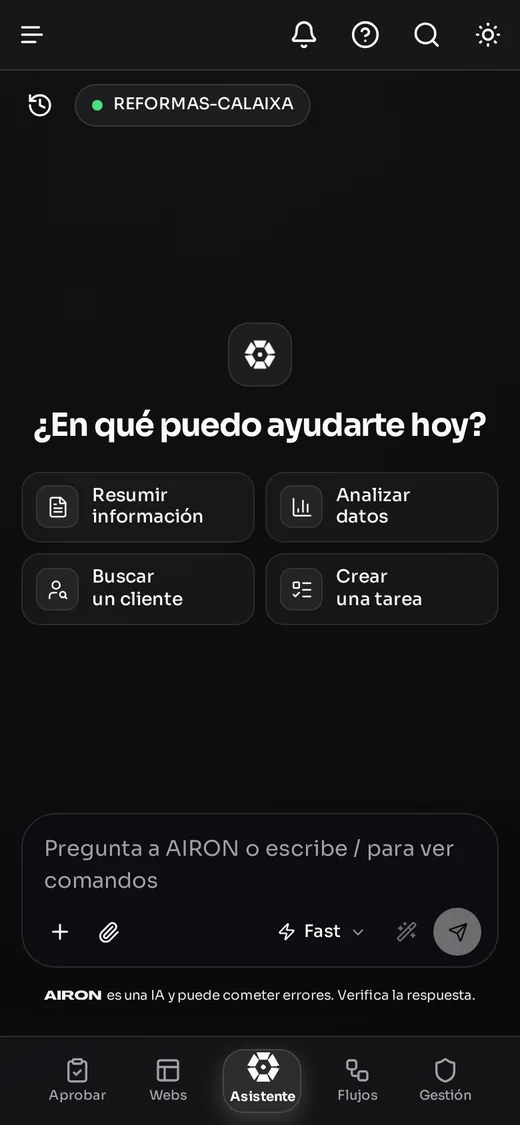
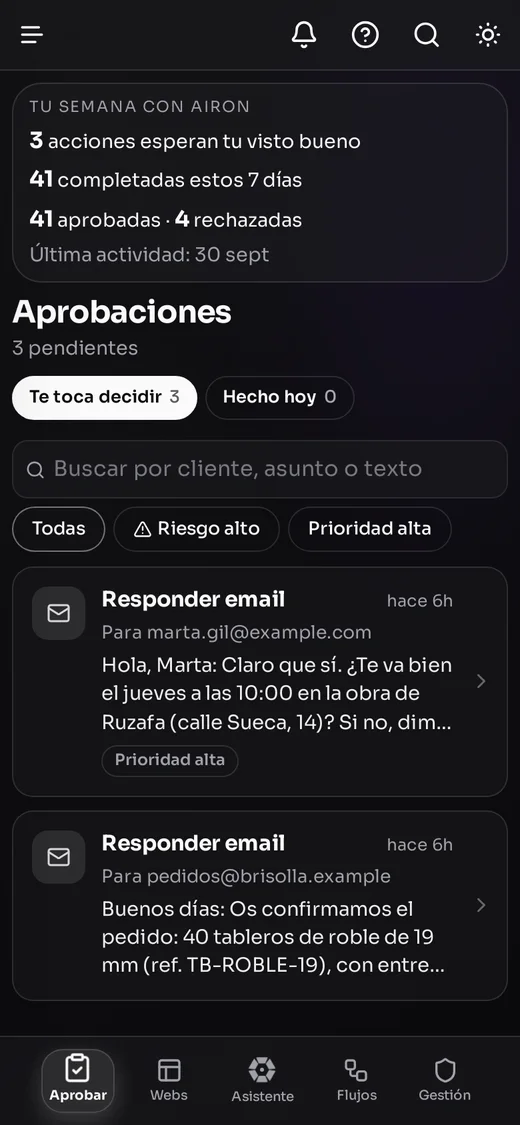
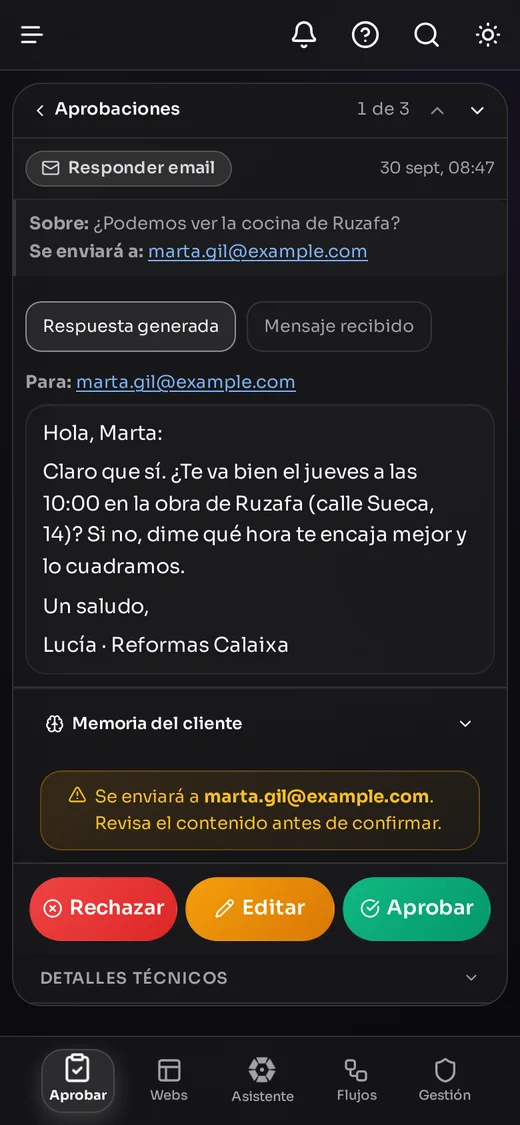
- Enterprise-grade security
- Smart automation
- Real-time metrics
- Work without borders
Real app screenshots · sample data
Integrations
Works with the tools you already use
- Gmail
- Outlook · Microsoft 365
- Google Calendar
- Google Drive
- OneDrive
- Dropbox
- AIRON CRM
- Facturales
- Alegra
- Stripe
- Google Analytics 4
- Google Ads
- Search Console
- Trello









And you talk to it wherever you are
- Web panel Assistant, approvals and flows
- WhatsApp Ask, then approve with a “yes”
- Android app beta Approve with a tap and dictate
- iPhone app Approve with a tap and dictate
- AIRON for Chrome beta Works on the websites you use
- AIRON for Excel beta VAT and dashboards in your sheet
Features
A specialized digital team for every area of your company.
AIRON takes on the day-to-day operational work so your human team can focus on growing, deciding and creating.
Secure and transparent
What AIRON starts on its own never goes out until a person approves it, and every action is recorded in Activity. Your data is hosted on servers in Frankfurt (EU) and each company is isolated from the others.
Intelligent automation
Ask it for research or a report and AIRON chains the steps: it searches the web and your documents, compares, calculates and hands it to you as a PDF with every source cited.
















Cross-platform sync
Keeps your tools in sync —Gmail and Outlook, Drive and Dropbox, Google Calendar, Trello, AIRON CRM, invoicing, Google Analytics, Ads and Search Console, and Instagram— with consistency and reliability across the whole workflow.


Where your team already works
Talk to AIRON from the panel, over WhatsApp or with voice notes, and from the client portal; the Chrome and Excel extensions are in beta. It connects with the email, calendar and tools you already use, without changing how your team works.
Reading Marta Gil’s email: she wants a visit to see the kitchen.
Tableros Brisolla invoice filed in Drive › Invoices 2026.
Draft in your tone is ready: it’s waiting in Approvals.
“Kitchens Valencia” is spending without bringing requests. Pause it?
Reading Marta Gil’s email: she wants a visit to see the kitchen.
Tableros Brisolla invoice filed in Drive › Invoices 2026.
Draft in your tone is ready: it’s waiting in Approvals.
“Kitchens Valencia” is spending without bringing requests. Pause it?
Real-time notifications
See in real time what AIRON is doing, what it has finished and what is waiting for your approval, with every step recorded in Activity.
Many at the service
of one.
AIRON is a multi-agent AI operations platform: many specialized agents, orchestrated around a single authority — yours.
Read it two ways: six pieces around a core —one made of many— and an eye that watches.
- 01
Specialization
Each agent, an expert. Admin, technical, marketing, business: many specialists instead of one bot that does everything just okay.
- 02
Orchestration
Working as one. Department orchestrators distribute, coordinate and chain the agents together. Direction, not noise.
- 03
Automation
It does not advise: it executes. Email triage, posts, follow-ups, incidents… the operational work, done.
- 04
Monitoring
The eye that never sleeps. Watches servers, deadlines, blockers and recurring incidents before they blow up.
- 05
Synthesis
From noise to decision. Consolidates and prioritizes everything that happens into executive summaries ready to act on.
- 06
Learning + memory
Every day it knows you better. Persistent memory of the business and continuous detection of improvement opportunities.
And at the center: you.
The core is not the machine, it is your judgment. AIRON proposes and executes; you approve and decide — propose, approve, execute.
Human control
You have the final say.
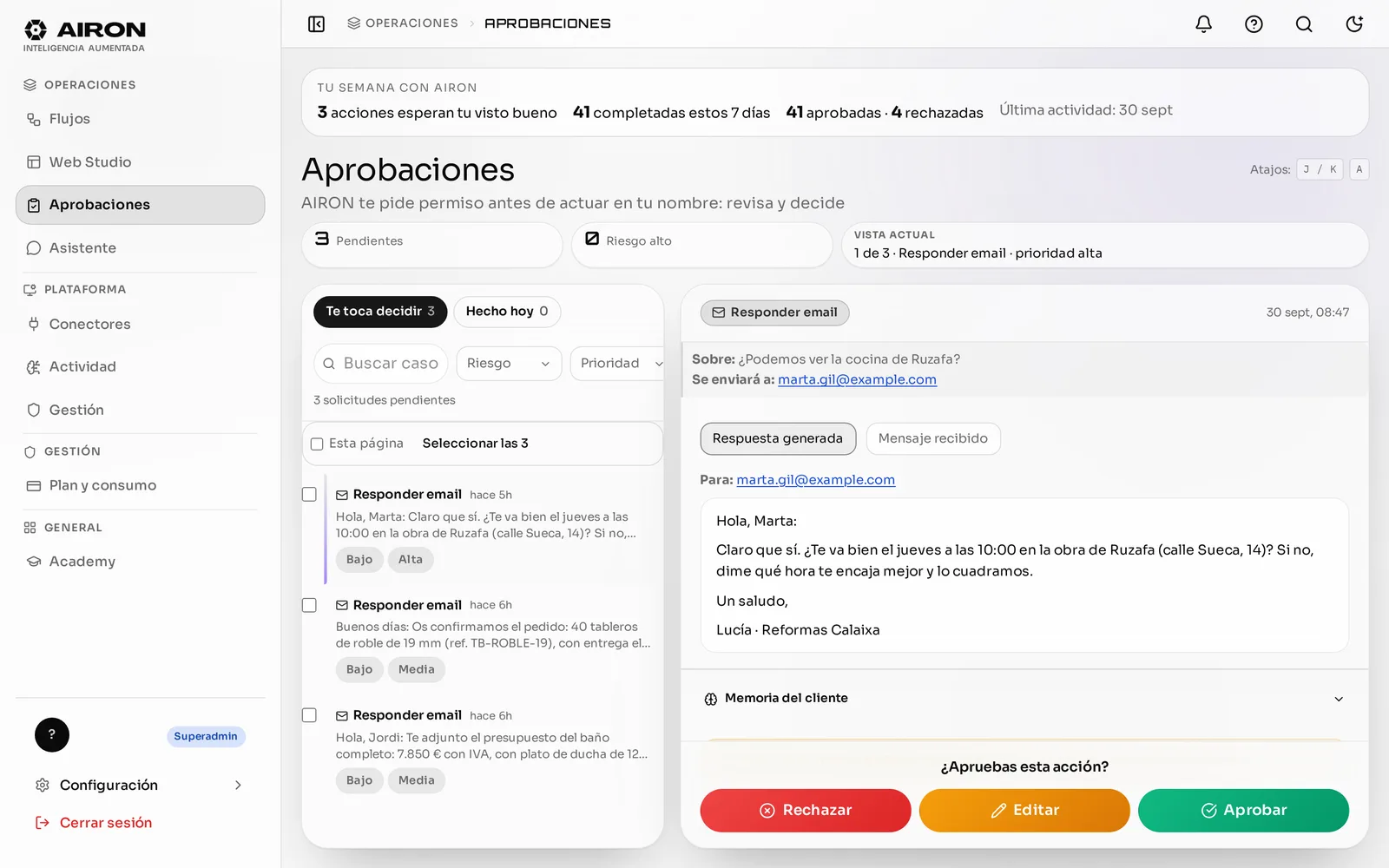
AIRON prepares the work. Whatever goes out is decided by a person —in the panel, on mobile or with a “yes” on WhatsApp— and it is recorded.
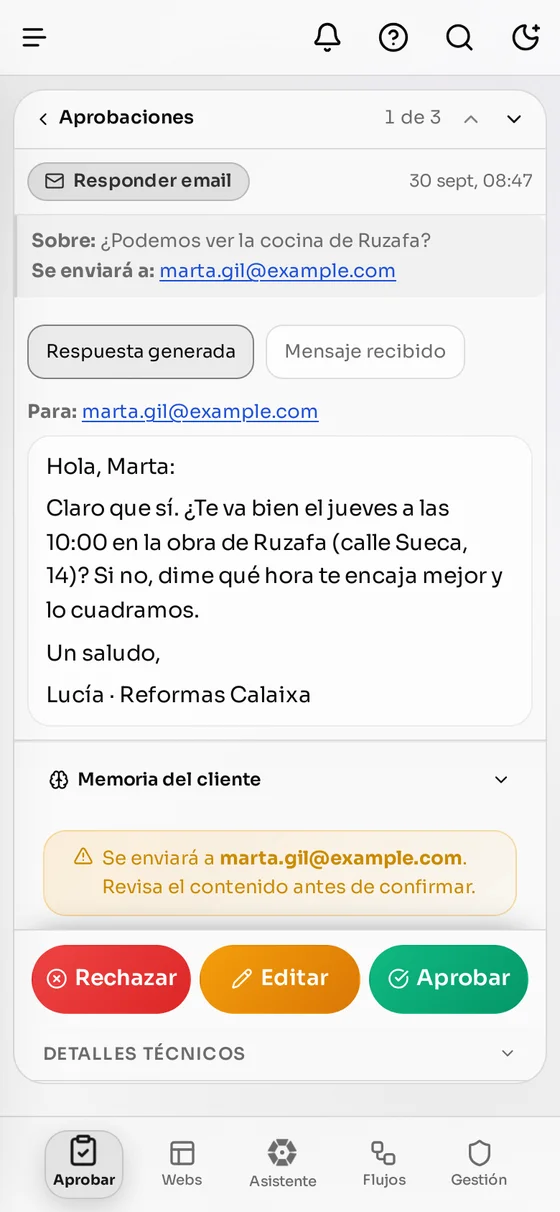
-
Approving is a permission
Only people who have it can send, from the inbox, the chat or WhatsApp.
-
Once, on what you saw
Each draft is sent once, in the version you approved.
-
Your chat is yours
Neither your colleagues nor your Superadmin can read it.
Flows
You describe it in the chat. AIRON builds it, tests it with you and asks permission before sending anything.
A flow is “when this happens, if that holds, do this”. It triggers on its own when an email or a WhatsApp document arrives, at a scheduled time, when an invoice is paid in Stripe or when you issue one in Facturales. With “Test” you see what it would do before switching it on.
- Pieces from a validated catalogue: nothing improvised
- “Test” before activating, with no external effects
- Whatever goes out always waits for a person
- Every run is recorded
- Flow steps
- Trigger: Email — with attachment · from suppliers — completed
- Condition: Invoice? — income/expense — completed
- Control (no): Stop — not an invoice — skipped
- Action (yes): Drive — Invoices › quarter folder — preview, no external effect
- Action: Invoice ledger — issued and received — preview, no external effect
The invoice is filed in its quarter’s folder and recorded in the invoice ledger, with the supplier, base and VAT.
- Flow steps
- Trigger: Stripe — paid invoices — completed
- Action: Drive — Payments › year folder — preview, no external effect
- Action: Invoice ledger — issued — preview, no external effect
Exact data from Stripe, no eyeballing PDFs: the invoice is filed and the payment recorded in the issued ledger.
- Flow steps
- Trigger: Scheduled — every Monday at 8:00 — completed
- Action: Send email — to management · with your OK — waiting for approval
The email always waits for a person to approve it, and it is sent only once. Scheduling sends in flows is in beta.
If a step fails, the flow stops and tells you which one; repeating it does not resend what was already sent. Each flow only works with your company’s connectors. Examples with fictional data.
Web Studio
Your website, told in one sentence.
Tell it about your business —or dictate it— and AIRON builds a complete 3-to-6-page website with your photos. You edit it by touching the text.
- Photos chosen for each section, starting with yours
- Four styles: Indochine, Juris, Aivo and Nui
- “Improve the text”, colours, fonts and backgrounds in one tap
- It’s yours: the code stays in your GitHub and the site in your Vercel
Creating your website · 5 pages
«Full renovations, kitchens and bathrooms in Valencia, 14 years of experience. We want to show our projects and get quote requests.»
Creating your website · 5 pages
«Physiotherapy clinic in Valencia. One-hour sessions with the same physio; we want people to book without calling.»
Creating your website · 5 pages
«Brand and design studio: identity, websites and packaging. We want to show our work and get new projects.»
Creating your website · 5 pages
«Family winery in Requena with tours and tastings. We want to sell visits and make our wines known.»

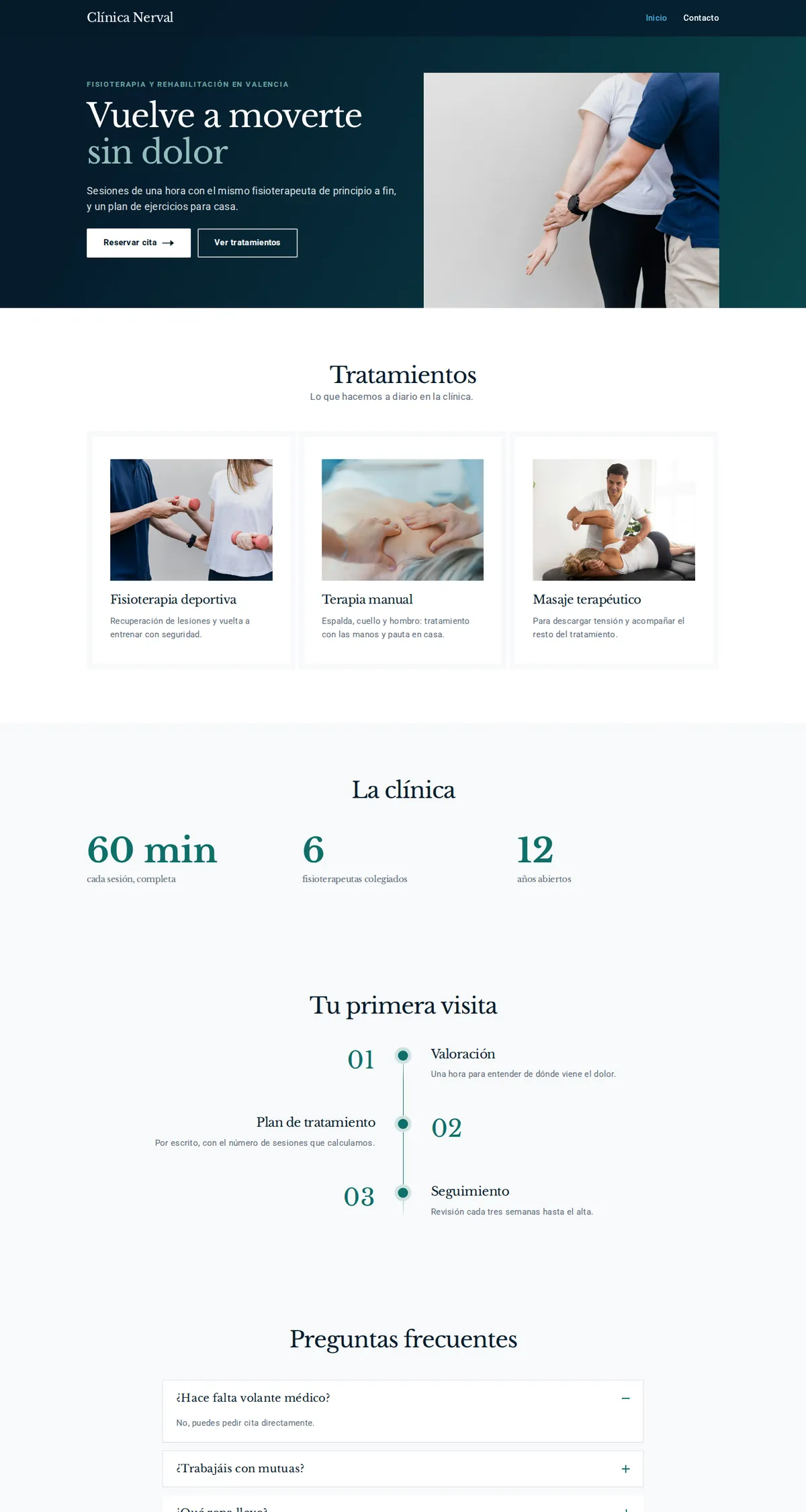
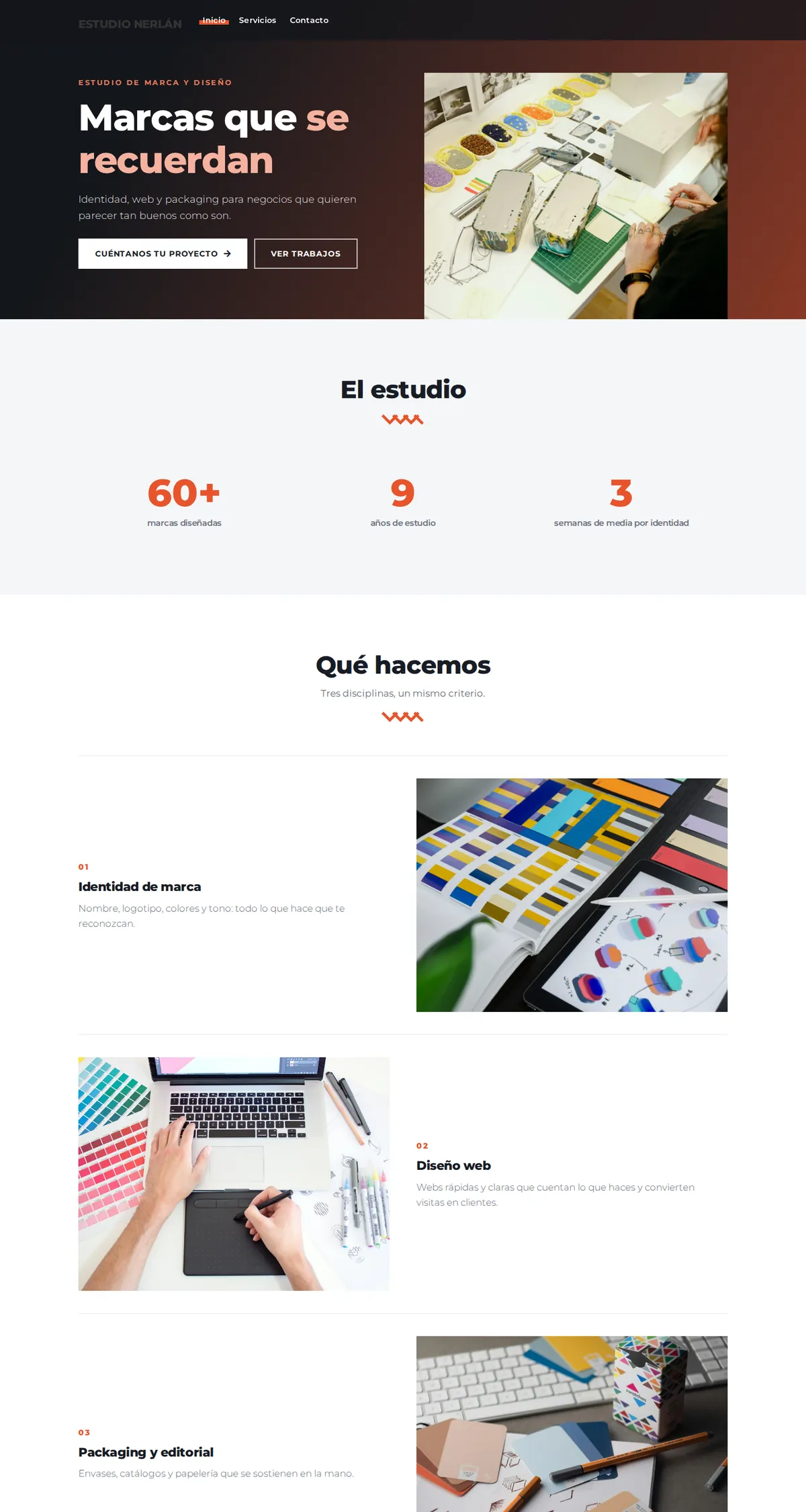
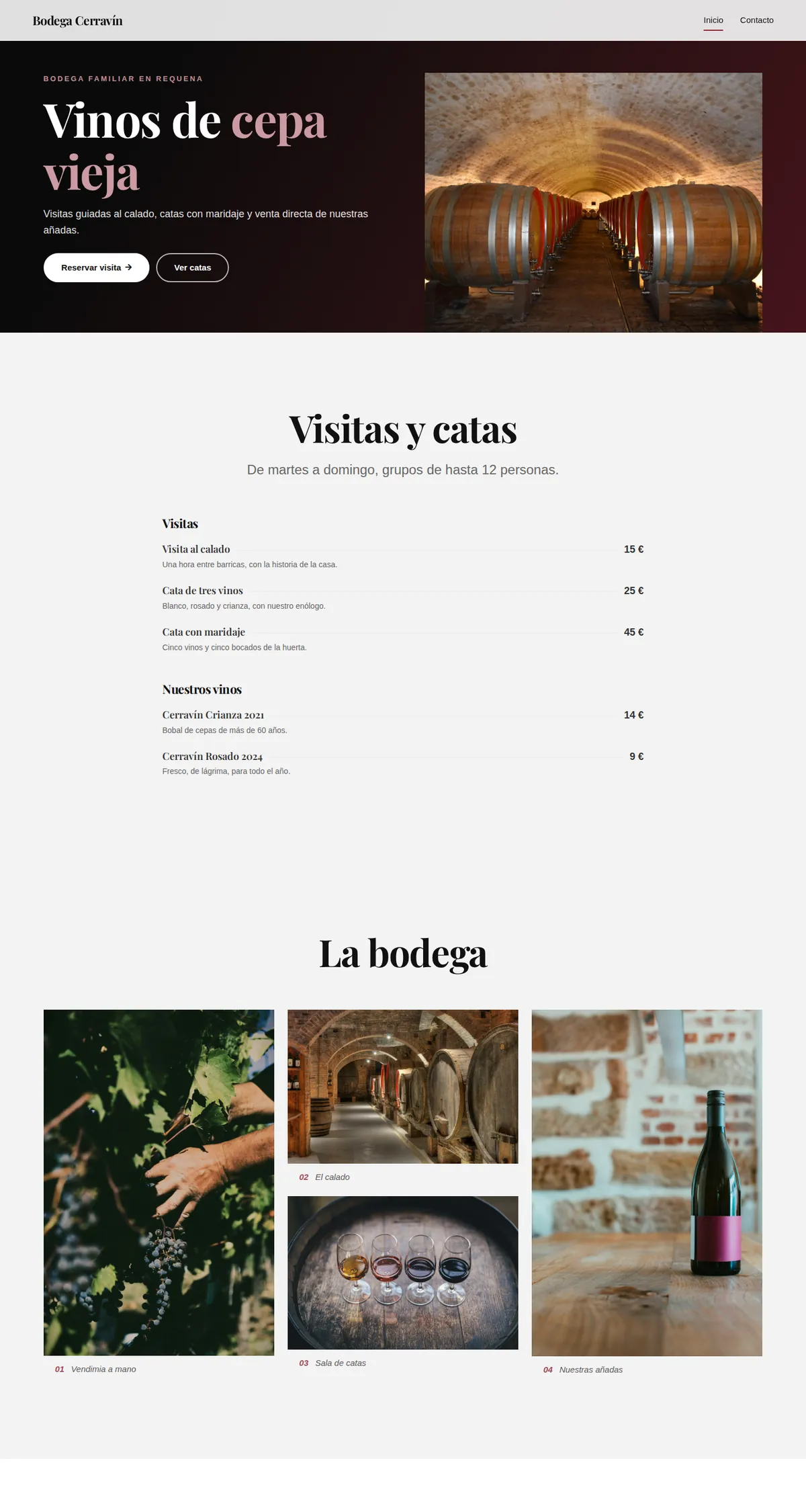


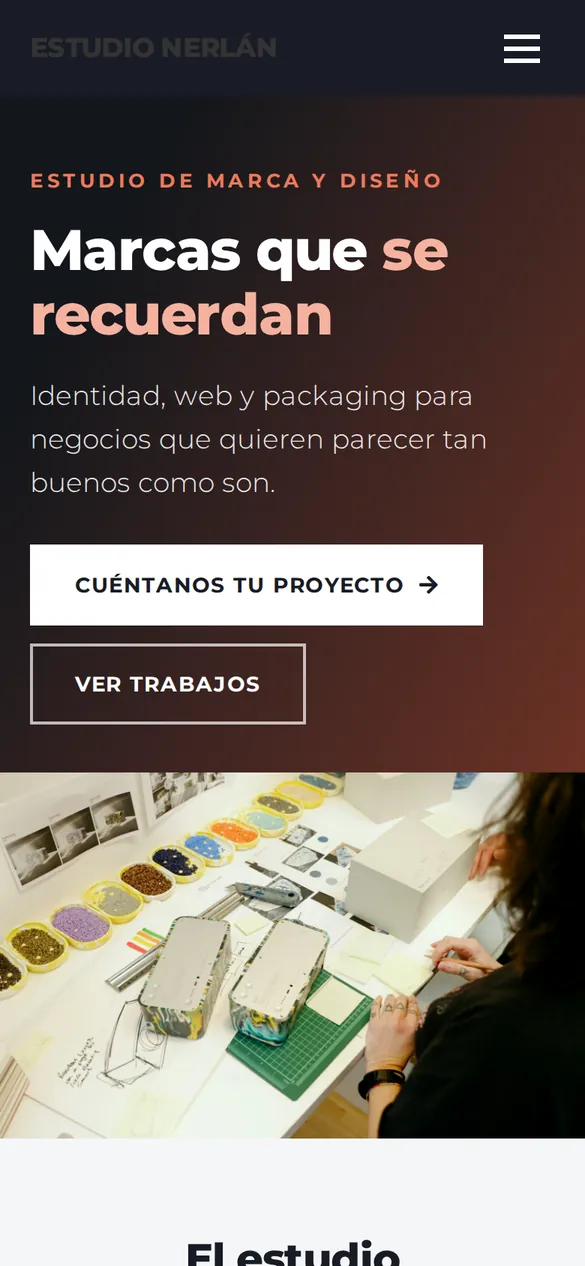

Example websites made with Web Studio · fictional businesses
Where it works
One AIRON, where you already work.
Same permissions, same approvals and the same memory everywhere. You start in the panel and approve from your phone.
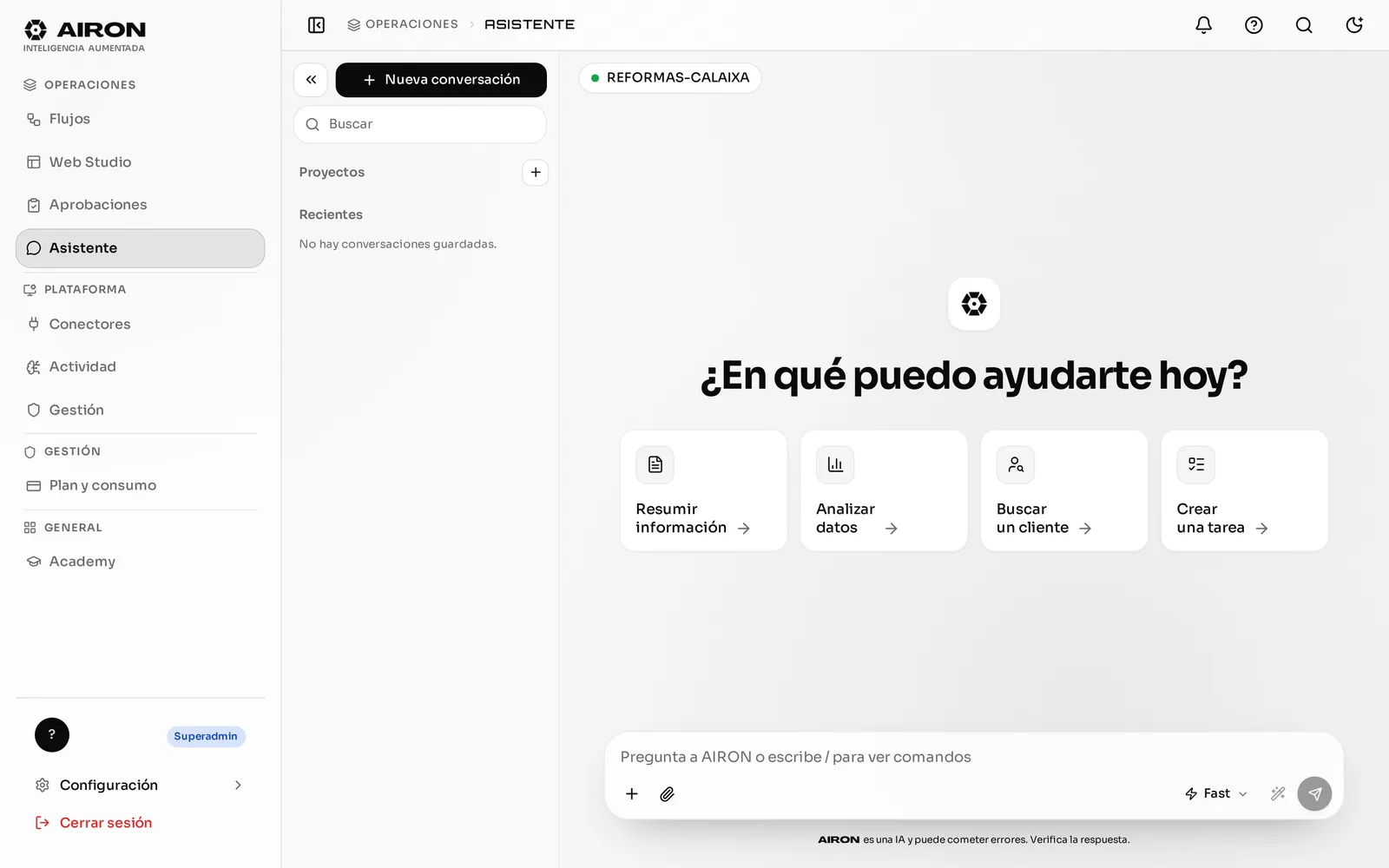
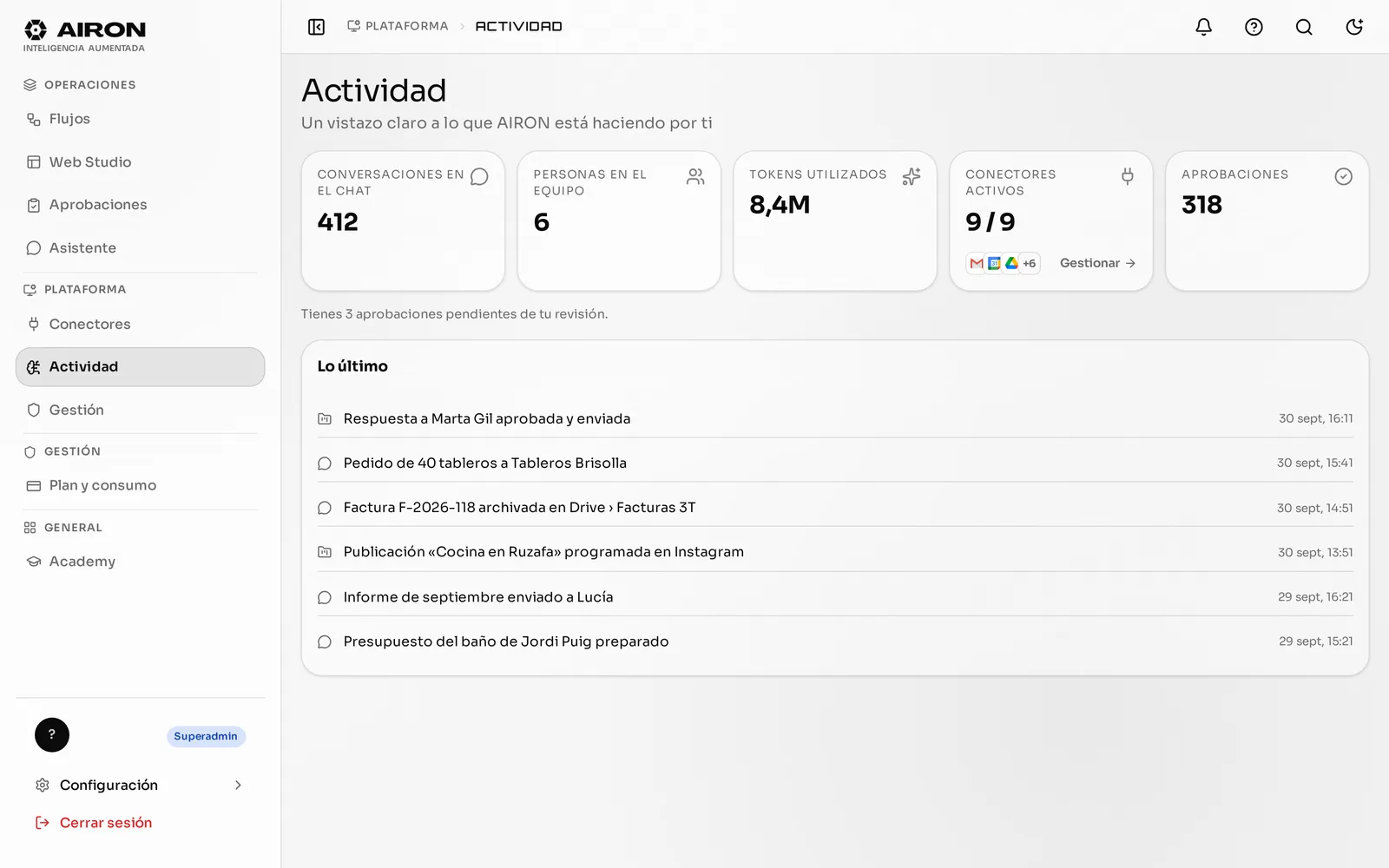
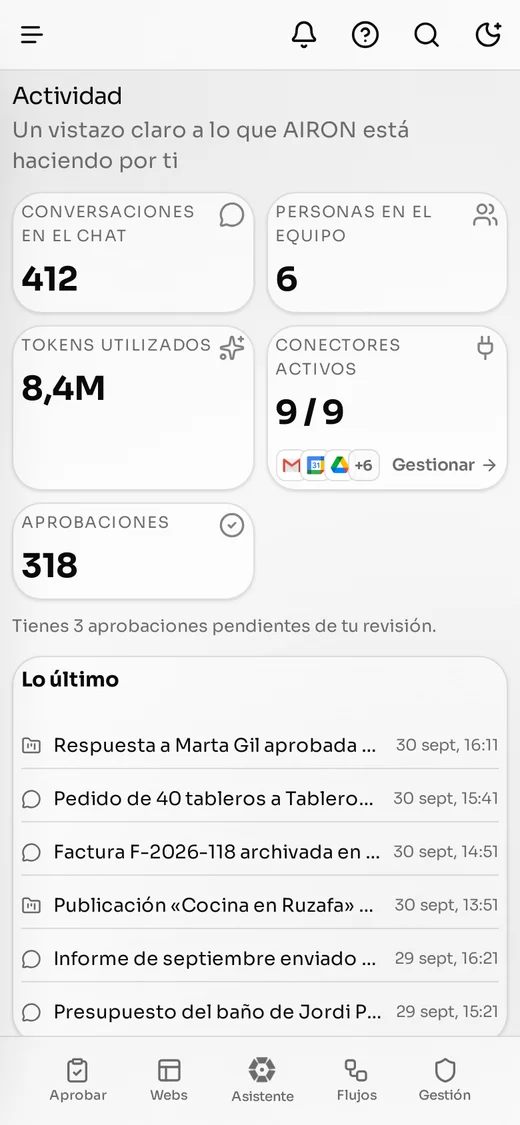
Web panel. The assistant, Approvals, Flows and Activity, with your team and their permissions.
WhatsApp. Ask for things, approve them with a “yes” and send or receive files from the chat you already use.
Client portal. Your company approves, sees Activity and manages its website, its flows and who does what.
Android app. The same AIRON in your pocket: approve with one tap and dictate what you need.
iPhone app. The same app on your iPhone: approve with one tap and dictate what you need.
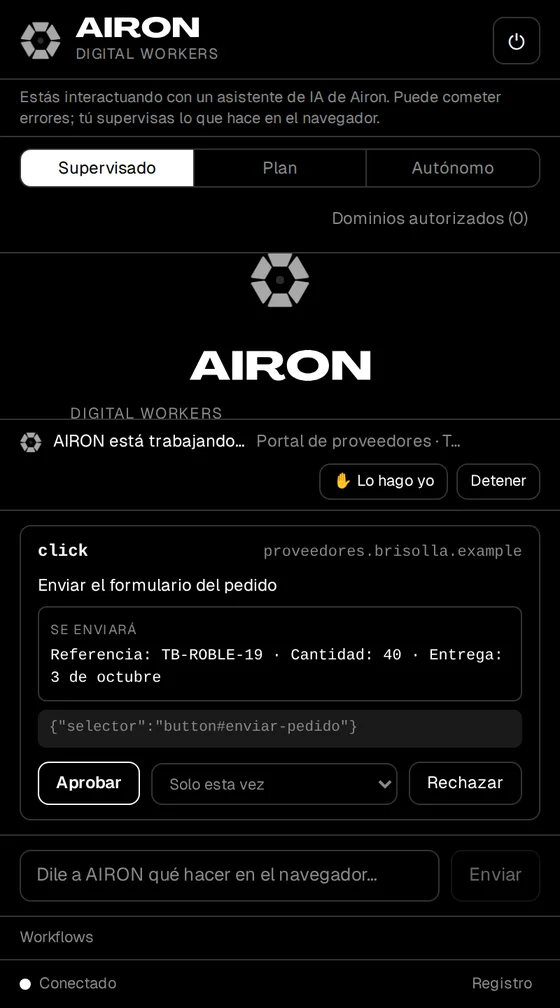
AIRON for Chrome. It works on the websites you already use, even without an API. It asks for permission and never touches passwords or payments.
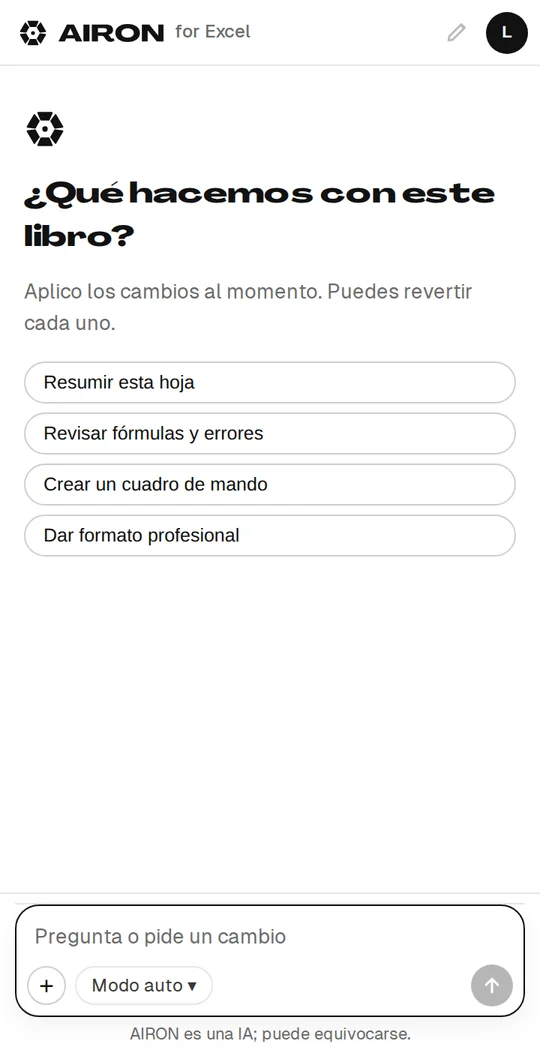
AIRON for Excel. Dashboards, VAT and cash flow inside your sheet, and everything can be undone with Ctrl+Z.
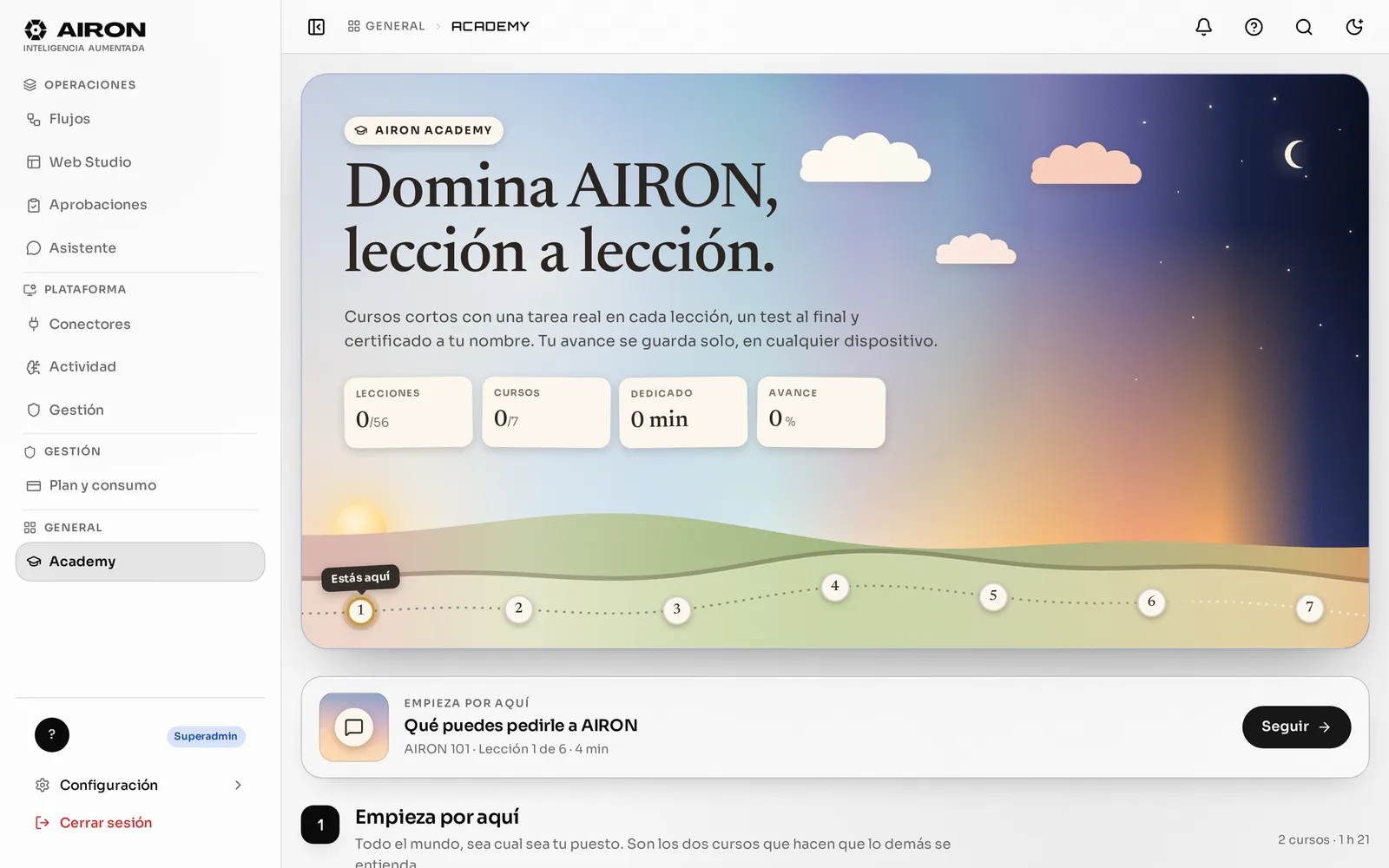
AIRON Academy. More than 80 short lessons and a certificate for each person: the AI training the AI Act asks for.
Integrations
Works with your tools. And works inside them.
It doesn’t just read: it prepares, files and updates inside each tool, and asks for permission when something goes out.

Gmail
Searches, summarises and sorts email; drafts replies with your signature and leaves them in Approvals.
- Reads
- Acts with your OK
- Triggers flows
For now we set up the connection with you while we finish the app verification with the provider.
Hover or focus a tool to see what AIRON does in it.
Recipes that already work
-
The invoice files itself
Gmail Drive Invoice ledger
It arrives by email, is saved in the quarter’s folder and recorded in the ledger.
-
One voice note and done
WhatsApp AIRON CRM Google Calendar
An audio after a meeting: a task in the CRM and an event in your calendar.
-
Every payment, in its place
Stripe Drive Issued ledger
Each paid invoice is filed and the payment recorded, with exact data from Stripe.
-
The report, with its source
Analytics Google Ads Search Console
You ask how the month is going and get figures with their source and a PDF to download.

Trust
You’re in charge. And you can check it.
Where each piece of data is processed, who sees what and what happens to your information if you leave. No small print.

Where each thing is processed
European Union · Frankfurt
- Your data, files and backups IONOS
- Computing the search index of your documents Google Cloud
- Result re-ranking Our own server
United States
- AI writing (language models) OpenAI · data processing agreement being formalised
Your tools (Gmail, Microsoft 365, Drive…) stay where you already have them.
-
A person decides
What AIRON starts on its own never goes out without approval. What you ask for is configured by the account administrator.
-
Your chat is yours
Neither your colleagues nor your Superadmin read it, and AIRON never quotes what you wrote to anyone else.
-
Your data, yours
Download it as a ZIP whenever you want. If you leave, it is deleted; only what the law requires is kept.
-
You always know it’s AI
A notice in the chat, a footer in emails and WhatsApp, and a verifiable signature on the PDFs and images it generates.

What we don’t have yet
- ISO 27001, SOC 2 or ENS certifications
- Language model processed in the EU
- Signed processing agreements with every provider (in progress)
Need any of this to decide? Write to us and we’ll tell you where it stands.
Resources
Latest learnings from AIRON
Guides and insights to automate operations without losing control.


Getting started
Starting is simple.
-
01 · Day 1
We connect what you use
Email, calendar and documents, with you. And you switch on assisted replies in the mailboxes you choose.
-
02 · Week 1
AIRON learns to write like you
It studies your sent emails to propose your tone; you review it before switching it on. You approve the first drafts.
-
03 · Month 1
The repetitive work, in flows
You describe in the chat what you do every week and it becomes a flow you can test before activating.
What people usually ask us
Does it send anything without my permission?
What AIRON starts on its own —replies to incoming emails, flow steps, posts— always waits for a person. What you ask for requests approval by default if it goes to third parties, is tax-related or spends money; the account administrator can adjust it tool by tool.
Where is my data?
On servers in Frankfurt (EU), together with the backups. AI writing is done by OpenAI in the United States. The full list of providers is public.
Does it work with my invoicing software?
Today with Facturales in Spain and Alegra in Colombia (where it also reads the DIAN XML), plus Stripe for payments. If you use another one, tell us which.
What is a credit?
The usage unit: a conversation is around 2 credits and an email with a draft about 0.3. The Basic plan includes 1,000 a month.
Can I cancel?
Yes. During the beta billing is monthly and you can cancel your subscription.
Does it work for an agency with several clients?
Yes: each client with its own profile, tone and portal, never mixed up. For agencies we set it up with you.
Which languages does it work in?
Spanish, English and Italian, and it replies in the language you write in.
Your digital team starts today.
We’ll show you AIRON with your own case in a short call. No commitment.